EVIDENCE REQUESTS · ADD-ON
Request evidence. Keep it with the right job.
Create a request from a job or visit, share its link manually with the authorised recipient, and review the response before accepting photos into the record.
Optional add-on, available only on eligible plans. Not included in Starter or the private evaluation. Availability and terms on request.
An accepted request, in its job context.
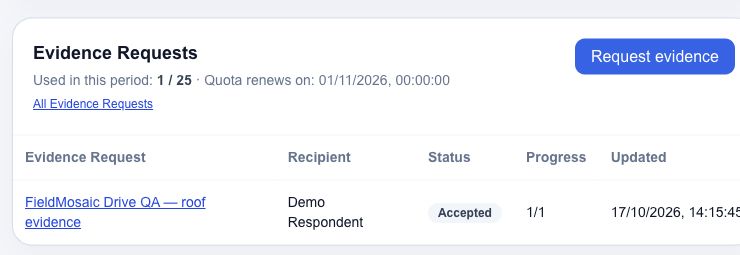
Missing evidence belongs with the job too.
Not all evidence is available during a visit. Request additional photos or answers and keep them linked to the job, rather than losing them in separate messages.
From request to acceptance, with review in between.
Evidence request
Specify what you need, the instructions and the expiry. Copy the link to share manually with the authorised recipient.
Recipient submission
The recipient opens the link in a browser, adds the response and photos, and reviews the submission. No FieldMosaic account is required.
Team review
Review the submission and request changes, if needed, before accepting it.
Acceptance into the record
Accept the reviewed evidence into the visit and keep its context linked to the job.
A link to the request. Your team keeps control of review.
The response does not automatically enter the visit record. The team can request changes before accepting evidence.
In this private Preview, the recipient must also be authorised through Cloudflare Access. Not requiring a FieldMosaic account does not remove that protection.
Before you request evidence
Are Evidence Requests included in the evaluation?
No. It is an optional add-on for eligible plans, outside Starter and the private evaluation.
Does the recipient need an account?
No FieldMosaic account is required. The link provides access to the request; Cloudflare Access authorisation also remains required in Preview.
Is the invitation sent automatically?
The link is copied and shared manually in this Preview. Automatic invitation delivery is not offered here.
Are photos accepted automatically?
No. The team reviews the submission and can request changes before accepting evidence into the visit.
How does evidence connect to the report?
Once accepted, evidence stays in the visit context. Word preparation continues to follow the scope and completed visits selected by the user.
Need to collect evidence after a visit?
Talk to us about your use case and Evidence Requests availability.
Optional add-on, available only on eligible plans. Not included in Starter or the private evaluation. Availability and terms on request.